Switching practice management software: the questions to ask first
LedgerOS · · 5 min read
Most firms change practice management software roughly once a decade, which means almost nobody is good at it. You do it during the one window a year you can afford to, you make the call on a demo and a price, and you find out what you actually bought in February.
This is the checklist I wish I had used. It is deliberately not a list of reasons to choose us — several of these questions are ones we answer badly, and I have said so where that is true.
Start with the export, not the import
Every vendor will tell you their import is easy. The question that actually predicts your migration is the one about the system you are leaving.
Ask your current vendor for a full export before you sign anything with anyone else. Not a sales question — a support ticket, in writing. What you want to know:
- Can you get your client list out as a CSV, with contacts, entities and tax IDs?
- Can you get every document out, in a folder structure that means something?
- Can you get open invoices and balances?
- How long does it take, and does it cost anything?
The answer tells you two things. It tells you what your new platform has to work with, and it tells you how that vendor treats a customer who is leaving — which is a reasonable proxy for how they will treat you if you stay.
Ask what does not come across
Any platform can list what it imports. Ask for the other list.
For most migrations, including onto LedgerOS, these do not move:
- Workflow templates. Your pipelines, statuses and task templates get rebuilt. This is usually half a day, and it is worth doing deliberately — the templates people carry over are generally the ones they had stopped liking.
- Historical time entries and work in progress. Nearly everyone bills out the old system's WIP there and starts clean in the new one. Reconciling two ledgers mid-season is worse than the alternative.
- Message history. Past client threads stay where they are.
None of that is a disaster. All of it is a nasty surprise in week two if nobody told you. When you are evaluating, make somebody say it out loud.
Count the seats, then count the tools
The per-seat price is the number everyone compares. It is the wrong number, because platforms include wildly different amounts.
Write down what your firm actually pays per person per year, across everything: practice management, document archive, review and annotation, tax research, e-signature, and whatever you use for bulk client email. Then ask each vendor which of those their seat covers and which you keep buying.
One thing worth checking specifically: whether e-signature identity verification (KBA) is included or metered. It is usually metered, including here, and the per-verification cost adds up on a firm doing a lot of 1040s.
Ask what your clients will see
You are buying two products. The one your staff use, and the one your clients use — and your clients will judge your firm on the second one without ever seeing the first.
Ask to see the client portal as a client, not as an admin. Then ask:
- Does it carry your branding, or the vendor's?
- Can you put your own domain on it, and does that cost extra?
- What does a client land on — a to-do list, or a folder tree they have to navigate?
- What happens on a phone?
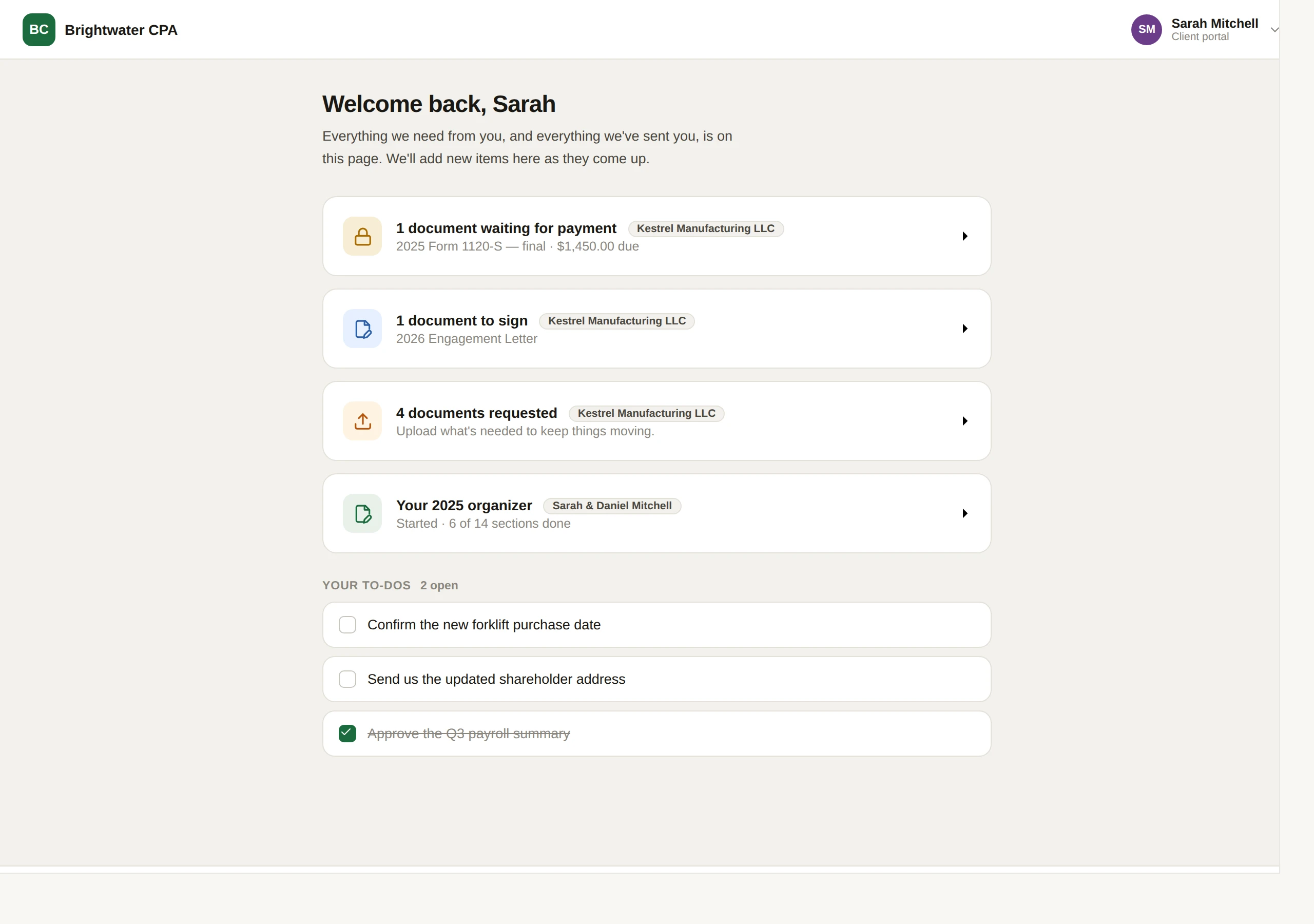
A portal a client cannot work out is a portal that generates email, which is the thing you bought it to prevent.
Make the demo show you a failure
Demos show the happy path. You are buying the unhappy one.
Ask the salesperson to show you what happens when:
- A document arrives that the system cannot match to a client.
- A QuickBooks sync hits something it cannot resolve.
- An email connection stops working.
- Someone uploads the same file twice.
You are not looking for these never to happen — they happen everywhere. You are looking for whether the system tells you. A platform that silently drops an unmatched document into a folder nobody opens will cost you more than one that puts it in a queue with a count on it.
Ask the AI questions properly
Every platform in this category now has AI in it. Two questions separate the useful from the decorative:
Where do the answers come from? If a research tool answers from the open web, its citations are suggestions. Ask whether sources are restricted, and to what.
How do you know when it is wrong? This is the one that matters. A tool that is confidently wrong at 11pm in March is worse than no tool. Ask whether citations are checked against the source, and what the interface shows you when a check fails.
Do it out of season
The single best predictor of a smooth switch is the month you start.
May through October, a roster import and an archive run are an afternoon, and rebuilding your pipelines is an evening. In February they are neither, and the pressure makes you skip the duplicate review — which is how a firm ends up with two of every client and no idea which one has the documents.
If you are reading this in January, the answer is almost always: shortlist now, decide in April, move in May.
The one question to ask yourself
Not "is this better than what we have". Almost anything is better than a seven-vendor stack held together by one person's memory.
Ask instead: in three years, when we have twice as many clients, does this shape still work? Per-module pricing that is affordable at four staff is a different conversation at twelve. A portal your clients tolerate is a different thing from one they use.
That is the question I got wrong the first time, and it is the reason I ended up building this.
LedgerOS runs the whole practice — clients, documents, e-signatures, research and billing — for $129 per user per month.
Start free trial